Over the years, I tried to find ways to speed up and provide a unique time picker for my users and subscribers. And I ended up working on different classes for this need:
DropClock - is a time picker based on combobox. It has Interval property (default is 1) that allows faster picking of the hour and minute portion. If interval is say set to 5, then the values shown will be with interval of 5, i.e., 5,10,15,20.... But it still is not fast enough because user still has to scroll down on the combobox especially if Interval is on default 1.
![]()
Then I created ScrollTime class which is like on Android. It works with mouse scroll where you position your mouse pointer above the hour and scroll up and down. The same on minute. But it still is not fast enough too, plus it eats space on form.
![]()
Finally I created TimerX which is what I used in dtPickerX class for its time needs. This is based on spinners so user can either type or spin the values. But then it still is not fast enough.
I need something that will really make my users and subscribers' lives easier.
Finally I thought of a new idea this morning and I started working on it. And behold my latest class, DropTime class.
![]()
And using this is damn very fast. Where the user will simply do this: click, click, click, click. Just like when you are reading it. Of course, nothing will beat a textbox with picture "99:99" as all we need to do is type 4 numbers there. But who wants a plain textbox for time these days?
Anyway, finally I am very satisfied with this that I also replaced TimerX in dtPicker with this one.
![]()
Additional Properties for the dropdown section only
Themes = Default value is .F.. Turning this to .T. will remove the sunken effect of selection and will replace the appearance with a 3D effect
Alignment = 1 is Left (Default) and 2 is Right (Default on dtPickerX)
BackColor and ForeColor = well, colors
This will be part of the next update to my subscribers (including the enhancements on NavigatorX). Cheers!
DropClock - is a time picker based on combobox. It has Interval property (default is 1) that allows faster picking of the hour and minute portion. If interval is say set to 5, then the values shown will be with interval of 5, i.e., 5,10,15,20.... But it still is not fast enough because user still has to scroll down on the combobox especially if Interval is on default 1.

Then I created ScrollTime class which is like on Android. It works with mouse scroll where you position your mouse pointer above the hour and scroll up and down. The same on minute. But it still is not fast enough too, plus it eats space on form.

Finally I created TimerX which is what I used in dtPickerX class for its time needs. This is based on spinners so user can either type or spin the values. But then it still is not fast enough.
I need something that will really make my users and subscribers' lives easier.
Finally I thought of a new idea this morning and I started working on it. And behold my latest class, DropTime class.
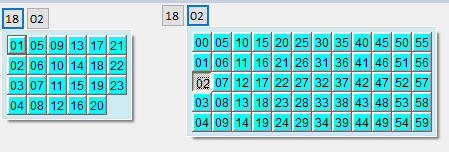
And using this is damn very fast. Where the user will simply do this: click, click, click, click. Just like when you are reading it. Of course, nothing will beat a textbox with picture "99:99" as all we need to do is type 4 numbers there. But who wants a plain textbox for time these days?
Anyway, finally I am very satisfied with this that I also replaced TimerX in dtPicker with this one.
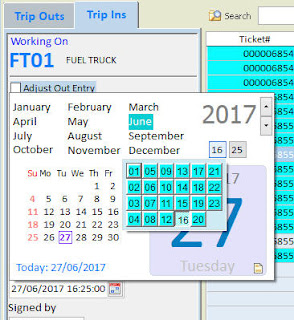
I am sure you will say, why not put the dropdown time going to the right as it looks better? Until I find why clicking outside the border of its parent form causes it to close the dropdown portion of dtPickerX, it will remain that way.
Themes = Default value is .F.. Turning this to .T. will remove the sunken effect of selection and will replace the appearance with a 3D effect
Alignment = 1 is Left (Default) and 2 is Right (Default on dtPickerX)
BackColor and ForeColor = well, colors
This will be part of the next update to my subscribers (including the enhancements on NavigatorX). Cheers!